Minecraft has two main versions. They are Java Edition and Bedrock Edition.
Both versions let you build, mine, craft, explore, and fight mobs. But they are not exactly the same.
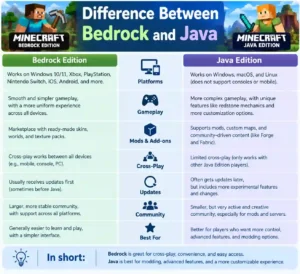
The main difference between Bedrock and Java is the devices they work on and some game features.
What Is Minecraft Java Edition?
Minecraft Java Edition is made mainly for computers.
You can play Java on:
- Windows
- Mac
- Linux
Java is popular with players who like mods, servers, shaders, and game tools.
What Is Minecraft Bedrock Edition?
Minecraft Bedrock Edition works on many devices.
You can play it on:
- Windows
- Xbox
- PlayStation
- Nintendo Switch
- Android
- iPhone and iPad
Bedrock also lets players on some different devices play together.
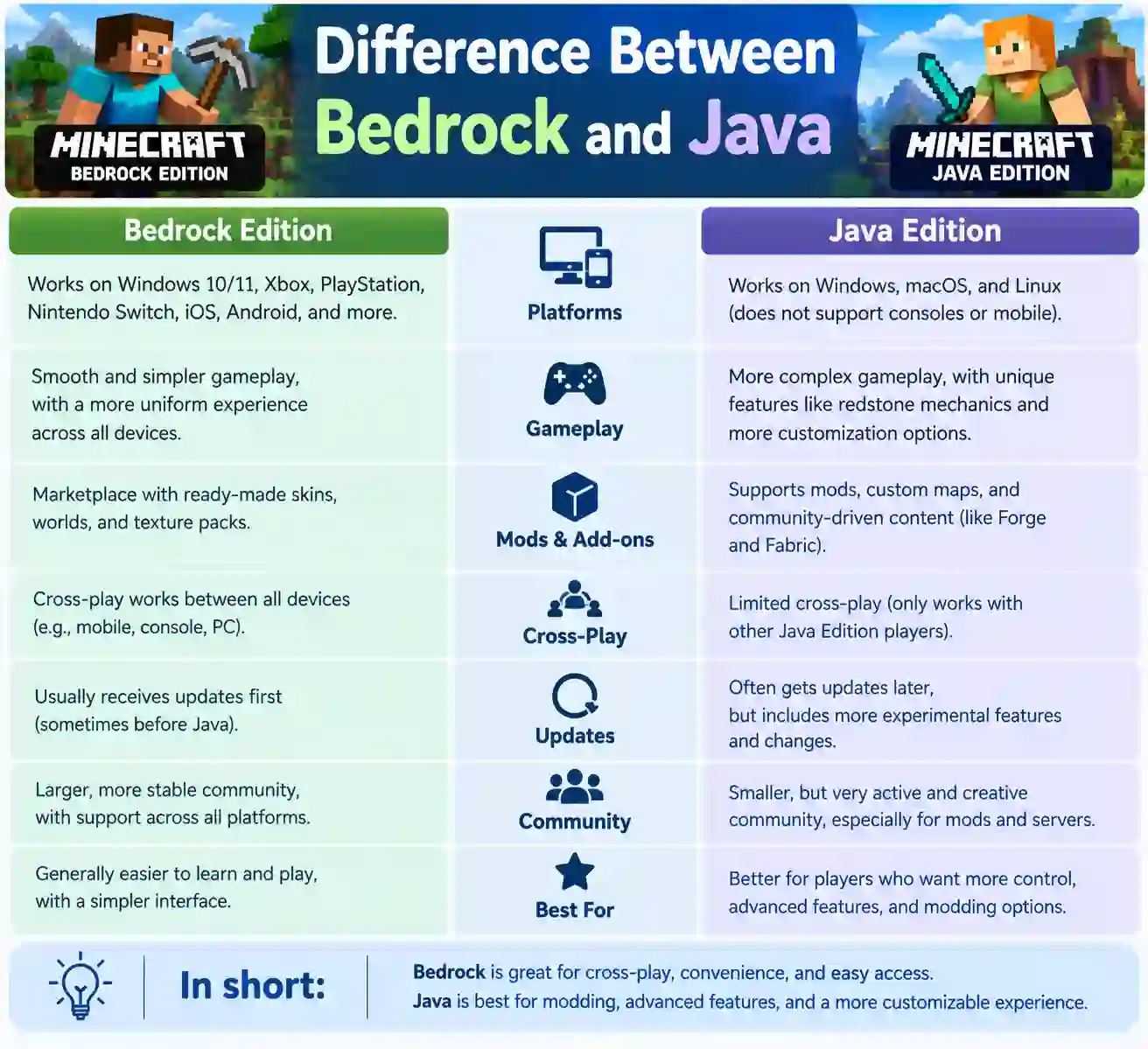
Difference Between Bedrock and Java Edition
Both versions are Minecraft, but they have some key differences.
| Feature | Java Edition | Bedrock Edition |
| Windows PC | Yes | Yes |
| Mac | Yes | No |
| Linux | Yes | No |
| Mobile | No | Yes |
| Console | No | Yes |
| Cross-play | Limited | Yes |
| Mods | Many | Add-ons |
| Marketplace | No | Yes |
| Controller | Yes | Yes |
| Touch controls | No | Yes |
| Redstone | Some differences | Some differences |
| PvP | Different | Different |
What Is the Main Difference Between Bedrock and Java?
The main difference is how the two versions work.
Java is mainly for computer players.
Bedrock works on computers, phones, tablets, and consoles.
Bedrock also has cross-play on supported devices.
Java has a large community for mods and custom servers.
Difference Between Java and Bedrock in Game
The main game is very similar.
In both versions, you can:
- Build homes
- Mine blocks
- Make tools
- Find villages
- Fight mobs
- Make farms
- Explore caves
- Visit the Nether
- Visit the End
- Fight the Ender Dragon
But some game rules are different.
Redstone, mobs, combat, villagers, and farms can work in different ways.
So, a Java game guide may not always work the same way in Bedrock.
Java or Bedrock on PC?
If you play on a Windows PC, you may have both Java and Bedrock.
Java may be good for:
- Mods
- Custom servers
- Shaders
- PC tools
- Technical play
Bedrock may be good for:
- Cross-play
- Controllers
- Playing with console friends
- Playing with mobile friends
- Marketplace content
So, Java or Bedrock on PC depends on what you want to do.
Difference Between Bedrock and Java on PC
Both versions work on Windows PC.
Java is popular with players who want mods and custom servers.
Bedrock is useful if you want to play with friends on phones and consoles.
Is Console Minecraft Bedrock or Java?
Modern Minecraft on consoles is Bedrock Edition.
This includes:
- Xbox
- PlayStation
- Nintendo Switch
Java Edition is not the normal console version.
Is Mobile Minecraft Bedrock or Java?
Mobile Minecraft is Bedrock Edition.
Minecraft on supported Android and iPhone/iPad devices uses Bedrock.
Java is mainly for computers.
Is Java or Bedrock More Popular?
It is hard to say which one is more popular for every player.
Bedrock works on many devices. It is on phones, tablets, consoles, and supported PCs.
Java has a large PC community. Many Java players like mods, servers, and technical Minecraft.
Popularity can change based on the device and group of players.
What Is the Difference Between Minecraft Java and Bedrock and Deluxe Edition?
Java and Bedrock are Minecraft editions.
Deluxe Edition is a package. It can come with extra digital content.
This content may include:
- Skins
- Maps
- Texture packs
- Other game items
Deluxe Edition is not a third main version of Minecraft.
How to Tell the Difference Between Bedrock and Java
Check the device first.
- Android = Bedrock
- iPhone/iPad = Bedrock
- Xbox = Bedrock
- PlayStation = Bedrock
- Nintendo Switch = Bedrock
On a computer, you may have Java or Bedrock.
You can also check the Minecraft launcher to see which version you have.
Difference Between Bedrock and Java Redstone
Redstone is used to make machines in Minecraft.
You can make:
- Doors
- Farms
- Traps
- Pistons
- Clocks
- Other machines
But redstone does not work exactly the same in Java and Bedrock.
A redstone farm made for Java may not work the same way in Bedrock.
Always check which version a redstone guide uses.
Differences Between Bedrock and Java Redstone
Some redstone rules are different.
Pistons, timing, farms, and other redstone systems can work differently.
This matters most when you make large farms or machines.
Difference Between Bedrock and Java Wither
The Wither does not work exactly the same in both versions.
Its attacks and fight style can be different.
Because of this, fighting the Wither can feel different in Java and Bedrock.
Differences Between Bedrock and Java Wither
The Wither has some different attacks and behavior in the two versions.
If you watch a Wither guide, check if it is for Java or Bedrock.
Difference Between Bedrock and Java Skeletons
Skeletons can also act differently.
Their movement and attacks may change between the two versions.
So, fighting a skeleton can feel a little different.
Difference Between Bedrock and Java PvP
PvP means player versus player.
Java and Bedrock have different combat systems.
Java has an attack cooldown. Bedrock uses a different attack system.
Because of this, PvP can feel different in each version.
Difference Between Bedrock and Java Villagers
Villagers also have some different rules.
The differences can affect:
- Trading
- Breeding
- Villager farms
- Villager behavior
- Villages
This matters if you make a large villager trading area.
Difference Between Bedrock and Java Skins
Both versions use Minecraft skins.
Bedrock has the Minecraft Marketplace. Players can find many skins there.
Java also has many skins made by the Minecraft community.
The way skins are added can be different.
Difference Between Bedrock and Java Realms
Minecraft Realms lets you play on an online private world.
Java Realms are for Java players.
Bedrock Realms are for Bedrock players.
They do not normally use the same Realm.
Difference Between Bedrock and Java Gameplay
The basic gameplay is the same.
But some things can work differently.
These include:
- Combat
- Redstone
- Mobs
- Villagers
- Farms
- Spawning
- Commands
- World generation
These differences are more important for players who use complex farms or machines.
Difference Between Bedrock and Java Edition Minecraft
Both versions get Minecraft updates.
But a new feature may work a little differently in each version.
A Minecraft guide should tell you if it is for Java or Bedrock.
Differences Between Bedrock and Java 2025
Minecraft gets new updates over time.
Some game rules can change after an update.
So, an old guide from 2025 may not always match the newest version.
Always check the Minecraft version when using a guide.
Differences Between Bedrock and Java 2026
The differences between Bedrock and Java 2026 can also change as Minecraft gets updates.
The main differences still include:
- Device support
- Cross-play
- Mods
- Redstone
- Combat
- Mobs
- Other game rules
Difference Between Bedrock and Java Mods
Java has many Minecraft mods.
Mods can add:
- New mobs
- New blocks
- New items
- New places
- New tools
- New game features
Bedrock uses add-ons and other custom content.
Its add-on system is different from Java mods.
Difference Between Bedrock and Java Servers
Java has many community servers.
You can find servers for:
- Survival
- Skyblock
- PvP
- Creative
- Mini-games
Bedrock also has servers, but its server system is different.
Difference Between Bedrock and Java Marketplace
Bedrock has the Minecraft Marketplace.
You can find:
- Skins
- Maps
- Texture packs
- Add-ons
- Adventure content
Some items cost money.
Java does not use the same official Marketplace.
Difference Between Bedrock and Java Performance
Bedrock is made to work on many devices.
It can run on:
- Phones
- Tablets
- Consoles
- PCs
Java can also run well.
But Java performance can depend on your PC, settings, mods, and shaders.
Difference Between Bedrock and Java Controls
Java is mainly made for keyboard and mouse.
Bedrock supports:
- Keyboard
- Mouse
- Controller
- Touch controls
This makes Bedrock useful on phones and consoles.
Difference Between Bedrock and Java Graphics
Both versions can look good.
Java has many shaders made by the Minecraft community.
Bedrock also has graphics options.
Your device can affect how the game looks and runs.
Difference Between Bedrock and Java World Files
Java and Bedrock use different world systems.
A Java world cannot normally be opened directly in Bedrock.
Some tools can help move worlds between the two versions. But some parts may not move perfectly.
Difference Between Bedrock and Java Reddit
Reddit has many talks about the difference between Bedrock and Java.
Players often talk about:
- PvP
- Redstone
- Mods
- Farms
- Bugs
- Performance
- Servers
- Cross-play
- Mobs
These posts can show what players think.
But Reddit posts are personal views. They may not be true for every player.
Whats the Difference Between Bedrock and Java?
The biggest differences are:
- Bedrock works on more devices.
- Bedrock supports cross-play.
- Java has many mods.
- Redstone can work differently.
- PvP can feel different.
- Some mobs act differently.
- Villagers can work differently.
- Bedrock has the Marketplace.
- Java and Bedrock Realms are separate.
Whats the Difference Between Bedrock and Java Minecraft?
Both are Minecraft, but they use different systems.
The main survival and creative game is very similar.
The bigger differences are in:
- Multiplayer
- Mods
- Redstone
- Combat
- Mobs
- Servers
- Devices
Whats the Difference Between Bedrock and Java Edition?
Bedrock is used on modern consoles and mobile devices.
Java is mainly used on computers.
Windows PC players may have access to both versions.
Is There a Difference Between Bedrock and Java?
Yes.
There are many small and large differences.
Some are easy to see. Others are only important for technical players.
Is There a Difference Between Bedrock and Java Minecraft?
Yes.
Redstone, combat, farms, mobs, villagers, and multiplayer can work differently.
How to Tell the Difference Between Bedrock and Java Minecraft
The device is an easy way to tell.
Phone or modern console = Bedrock.
Mac or Linux PC = Java.
Windows PC = Java or Bedrock.
You can also check the game launcher.
FAQs
Can Java and Bedrock play together?
Not normally. They use different multiplayer systems.
Is Bedrock good for cross-play?
Yes. Bedrock supports cross-play on supported devices.
Is Java good for mods?
Yes. Java has a very large mod community.
Is Minecraft on Xbox Java or Bedrock?
Minecraft on Xbox is Bedrock Edition.
Is Minecraft on PlayStation Java or Bedrock?
Minecraft on PlayStation is Bedrock Edition.
Is Minecraft on mobile Java or Bedrock?
Minecraft on mobile is Bedrock Edition.
Which version has more mods?
Java has more traditional Minecraft mods.
Which version has cross-platform play?
Bedrock supports cross-platform play between supported Bedrock devices.
Final Thoughts
The difference between Bedrock and Java is important when you choose a Minecraft version.
Java is mainly for computer players. It is popular for mods, servers, shaders, and technical play.
Bedrock works on many devices. It also supports cross-platform play.
There are also differences in redstone, Wither, skeletons, PvP, villagers, skins, Realms, farms, and other game rules.
If you play on a phone or console, you will normally use Bedrock. If you play on a computer, you may be able to choose between Java and Bedrock.

I am a professional English article writer with expertise in creating clear, well-researched, and engaging content. I specialize in writing informative articles that maintain accuracy, strong structure, and a polished tone. My work reflects a deep understanding of grammar, vocabulary, and audience needs. I am committed to delivering high-quality content that communicates ideas effectively and adds value to readers.